Run the analysis.Rewind the mistake.
VeraTracer Desktop analyzes at full speed and checkpoints every step automatically — so you can branch into a new approach, compare results side by side, and rewind the moment a hypothesis doesn't hold. Nothing you've computed is ever thrown away.
Launching December 13, 2026 on macOS · Windows and Linux to follow
Built for the moment you'd normally wait
VeraTracer Desktop's engine is written to keep pace with how you actually think — run a transform, see it applied, run the next one. No spinner between the idea and the result.
Full speed, full history
Every run executes against an in-memory columnar engine, so even multi-join queries over tens of millions of rows return before you've moved your hand to the next key.
Every run is a checkpoint you can return to
Think of your analysis like a repository. VeraTracer Desktop saves state automatically as you work, lets you branch off to try a different approach, and rewinds instantly the moment a hypothesis doesn't hold — no re-running the whole pipeline from scratch.
Automatic checkpoints
Every transform, filter, and join is saved as its own restore point — no manual “save version” step required.
Branch freely
Try a second approach without touching the first. Compare both branches' results side by side before you commit.
Instant rewind
Jump back to any checkpoint in one click. The engine restores state — it doesn't replay the whole pipeline.
An interface that stays out of your way
Editor, checkpoint history, and live results share one window — so switching between writing a transform and reading its output never breaks your focus.
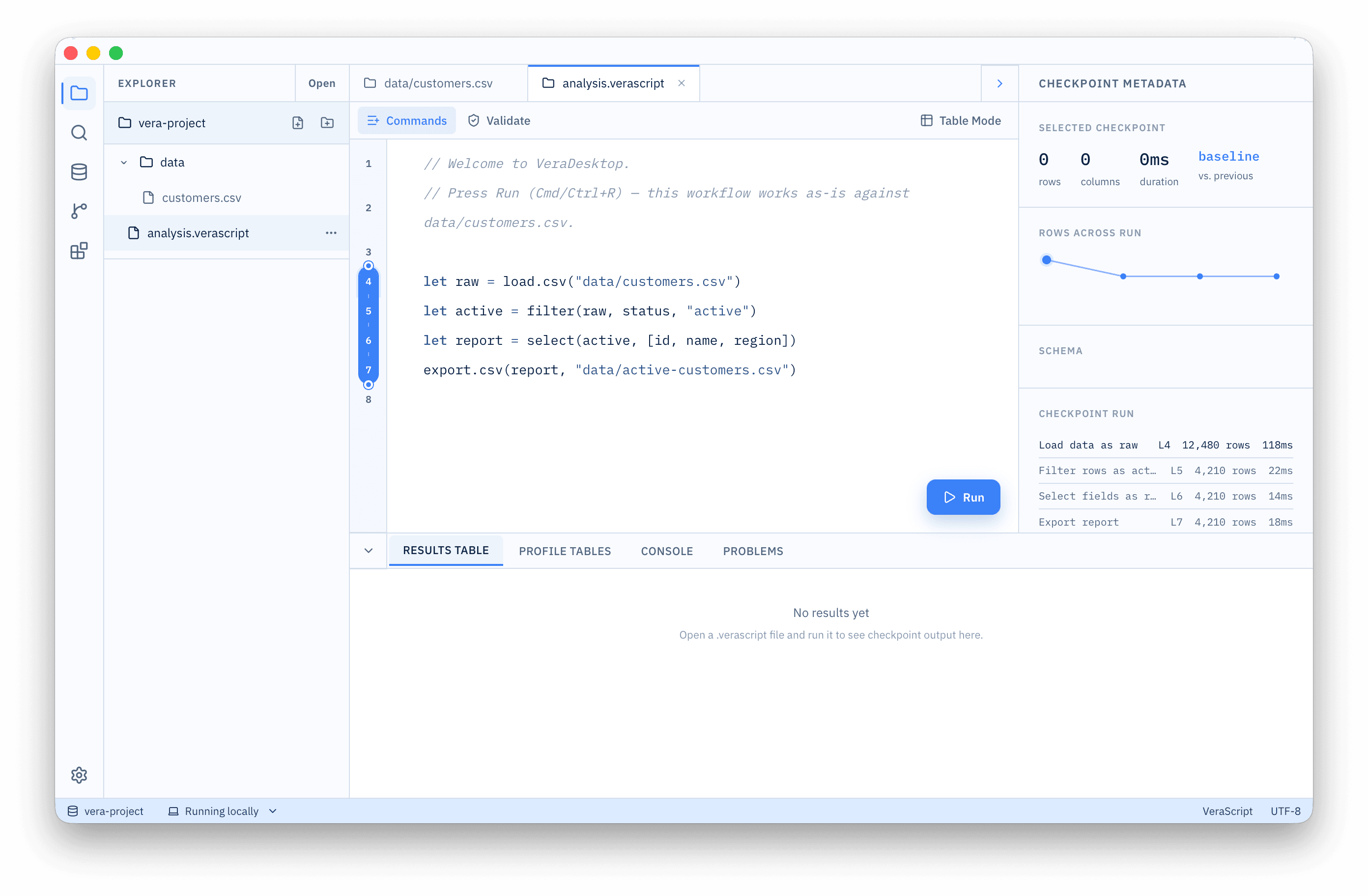
Checkpoint gutter
Drag the endpoints to pick exactly which range of your script re-runs.
Checkpoint metadata
Rows, columns, duration, and the delta against the previous checkpoint.
Results, profile, console
Every panel reads from the checkpoint you have selected — nothing goes stale.
Table mode: command it, don't type it
Build a workflow from the results table and VeraTracer writes the VeraScript for you. The file stays the source of truth, so anything you click can still be edited by hand afterwards.
Commands
Result
6 rows · 5 columns
| id | name | region | status | plan |
|---|---|---|---|---|
| C-1042 | A. Novak | us-east | active | Growth |
| C-1043 | J. Bakker | eu-west | past_due | Starter |
| C-1044 | R. Iyer | us-west | active | Scale |
| C-1045 | L. Marsh | eu-west | churned | Starter |
| C-1051 | M. Chen | eu-west | active | Growth |
| C-1058 | T. Okafor | us-east | active | Scale |
Add a command on the left. Every click appends a real VeraScript statement here — the file stays the source of truth, so you can keep editing it by hand.
Start analyzing. Never lose a step.
VeraTracer Desktop launches December 13, 2026 — free to try, full checkpoint history included, no account required.
Be there on launch day
Leave your email and we'll send you the download link the moment VeraTracer Desktop is available — nothing else.